In the early days it was easy to gain social media followers but just posting a blog. But these days using some digital ads or paid social options are essential for aiming a message to the right audience and at the right time.
Traffic from social media is certainly a positive signal of building awareness of your business online. It is an indicator of people sharing your site and consequently your business.
However, building traffic solely from social media postings limits the exposure of the message. Using ads strategically can aim your message to the right audience and provide an immediate response to events that need an extra effort to attract attention.
First, organic reach - the metric that connotes how far a post is going - is valuable when people are engaged. And there is value in sharing. But relying solely on organic reach (sharing) haphazardly subjects the post to a platform algorithm. Facebook, Twitter, and other social media platforms periodically change the signals that tell their algorithms what post is relevant to a given user. When a platform changes its algorithm to a factor that diminishes organic traffic, it can diminish how far the post is exposed.
Second, ads can be tailored to your ideal audience and where they are in the buyer’s journey. An ad that speaks to building awareness will highlight a product or service differently than that for buyers who are in a decision phase.
Moreover, social ads can be earmarked by location, gender, and customer interest, leading to visitor activity that reflects your desired audience for in-depth engagement at your site. This is a bit different from just liking a post and sharing it.
So while there is nothing wrong with encouraging shares on social media post as a part of a comprehensive plan, relying solely on social media posting is not a long term way to build customer interest and sales.
In short, do not ignore other marketing media for bringing your product, service, or site to everyone’s attention. Ensure that you understand how your social efforts influences your customer’s path to purchase. Knowing the role your social media has can help you decide how to best plan your budget. You can confirm how effective your campaigns are in a campaign report within an analytics solution.
The world of analytics has taken a lot of turns over the past several years. It went through a name change among analytics professionals - the Web Analytic Association changed its name to Digital Analytics Association years ago to better reflect the wider application of website analytics solutions from Google, Adobe, and others.
Today machine learning techniques are injected life into predictive analytics and customer analytics, both becoming one and the same in many instances.
Predictive analytics has existed for decades, but it has received increased attention as cloud computing expanded capability and access to that capability. Open source programming added collaboration among professionals, injecting developer technique and solutions. This has marshaled talents and resources and that has ushered in machine learning techniques in almost every industry and research.
With these factors in mind, analytics is experiencing advances in capability and opportunities associated with that capability. Let’s note what has been emerging so far:
Despite these advances, one asterisk remains: Marketers and analysts still require the skills and judgment to make sure the software reports accurate data. With companies expected to spend on analytics in general over the next 3 years, you should expect skills to increase appropriately. Marketers should participate in work conferences for tool as well as find ways to collaborate.
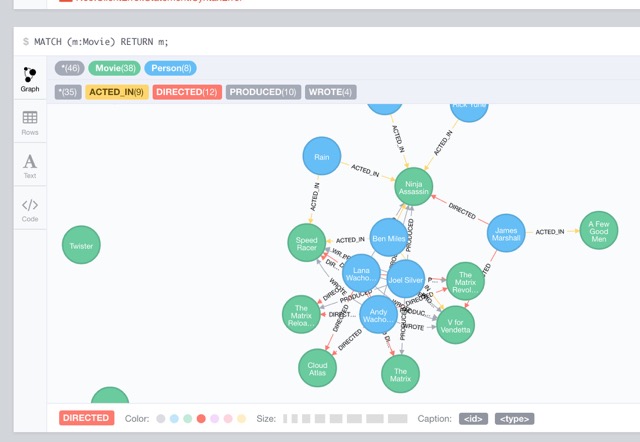
Data visualization tools like Neo4j can aid plans in data cleansing and planning regressions for machine learning techniques
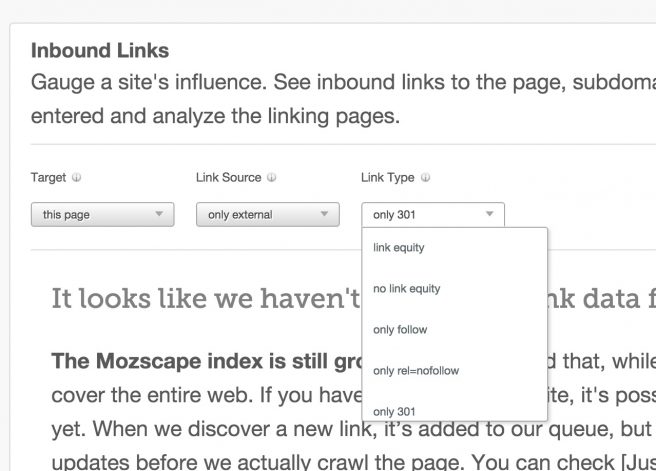
This tool from Moz can help you identify problems with 301 redirects
Every new year a number of businesses launch a new website, just like a number of people join a gym to get into shape. And as many newbies to a gym overlook certain steps in their regimen, many new sites overlook how to retain traffic from their old.
In short, they overlook how to use a 301.
Part of analytic services include a diagnostic in assessing how pages are accessed. One aspect that can come up in site redesign.
Background
First, let’s understand the basics for 301 code.
A 301 redirect is a server code that indicates to search engines that a certain page has been changed. The advantage of 301 redirects is that traffic is not loss due to a permanent change in website layout.
So traffic that heads to www.yourwebsite.com/oldpage can go to www.yourwebsite.com/newpage.
There are a number of ways that a 301 redirect is installed. Most methods depend on the programming language that powers a site, but all have a similar implementation protocol, to add a minor code indicator in the header.
There are other ways to indicate a change. Many servers use a file called the .htaccess file to add an indicator for page redirects. The file is placed in the host directory for the site.
To add a redirect, the .htaccess file is opened, and a line is added to the text in the file that indicates a redirect. Apache .htacess files use the following line:
Redirect/old_dir/ www.oldwebsite.com/new_dir/new file.html
Too many redirects ruin the optimization
A word of caution: using 301 redirects for URLs require judgement for the amount of usage. A few can make sense for a small site, and will not penalize search engine optimization. But creating a chain of redirects towards single URL can confuse search engines and can increase the time to load the desired end page because URL redirections triggers extra HTTP requests.
Tools
Some tools can use detect the presence of 301 redirects. Open Site Explorer can be used to highlight pages where 301 codes occurred (as well as 302s while you are at it). Go to Open Site Explorer and enter the website URL. Then select inbound links, then select the type of link that is the source of the connection.
Another, Content Forest,has a 301 and 302 creator online. For more on the difference on 302s and 301s, read this brief Zimana post.
Overall consider the purpose for 301s. The ultimate usage is for pages that clearly have no purpose, such as a page made to describe a service which is no longer available.
While at the O’Reily Solid conference back in 2015, I got to experience the best IoT innovations vendors had to offer. One of the more interesting vendors spotlighted was Digital Lumens, a that specializes in intelligent lighting or "smart lights”.

Smart lights are designed to provide light where there is activity on the factory floor. If there is no one in the area, the lights turn off progressively, dimming where needed and ramping up quickly when activity picks up immediately
They are an design aspect of Lighting as a service, a IoT subset trend in which the lights and the operation of their sensors are constantly adjusted to match factory floor operations. The result is managed costs through analytics and supporting technological service. The strong indicators that were shown in 2015 seems to be continuing into the next decade, as research firms have estimated market growth through 2020.
Digital Lumens has invested heavily in sensor-bearing light fixtures, and has seen several payoffs. To demonstrate the analytic potential, the outfit deployed sensor-bearing light fixtures within Fort Mason, the facility where the Solid conference was hosted.
I spoke with Kaynam Hedayat, Digital Lumens Vice President of Product Management and Marketing. Hedayat explained to me the potential in power metering - understanding the cost behaviors associated with power consumption. He explained the benefits as it related to recent API release for LightRules, a protocol meant to connect analytics and signal between Digital Lumens light fixtures and other equipment.
“Ultimately you learn which area in your manufacturing space you want light at a certain time. If there is no one in the area,you can achieve energy saving without leaving employees in the dark for critical equipment through progressive dimming, then ramping up quickly when employees come into a work area."
The chances for Digital Lumens’ success rides high as smart lights become a staple among IoT-influenced consumers as it has for B2B. Smart lights have allowed customization of an environment to fit a specific need, from helping babies to sleep to keeping people alert in low light environments.
The New York Times quoted Mariana Figueiro, who leads light and health research at the Lighting Research Center of Rensselaer Polytechnic Institute, about the consumer influence. In the article she states that “Lighting is really not about a fixture in the ceiling anymore….It’s about delivering individualized light treatments to people."
That customization can also address specific needs in the commercial environment such as safety. Digital Lumens introduced an emergency automation system based on its LightRules protocol called the Emergency Management Solution. The solution is meant to test lights for NFPA-101 compliance. As a result facility managers can schedule and perform automated emergency lighting tests to ensure employee safety prior to emergency situations.
As sensors like those in smart light fixtures pick up more applications in the real world, they will introduce new ways to consider analytics. Metrics will still be a proxy for human activity, but within IoT applications the activity will represented through the trigger of a sensor. This counters web analytics, which placed human activity in a context of digital media consumption, be it a downloaded white paper or a click from a paid search ad. It ultimately redefines the quality of the data received, with better notions of what to infer from the activity.
In May 2017, Zimana founder Pierre DeBois was interviewed at InteropITX in Las Vegas. Pierre stopped by the Information Week News desk to speak with Jim Conolly, Executive Managing Editor, offering his insights on All Analytics, an analytics online community, and on the state of business intelligence today.
You can also check out an article Pierre specifically wrote for Information Week. The post focuses on the growing shift in retail to mainstream e-commerce. It examines Amazon and compares its status in retail today against Sears, a stalwart department store which had a similar ascendancy in its heyday.
You can read the article, Amazon and Sears - Tales of Two Retailers, here.
The golden process in which customers magically arrive to your business after making a wonderful discovery of your website in Bing, Google , and Yahoo!
Yeah, right.
Many businesses rightly invest in their search optimization. Search traffic is a very cost effective way of gaining traffic. But the optimization is approached with a narrow scope on top SERP as the only measure of success. In the last two years, the inclusion of social media in search results, combined with search engine refinements means that customer can discover your business in more than one way. In fact the latest studies reveal nuanced search results that yield more conversions in a number of instances. Overlooking these researched efforts results in an overlook of more effective marketing.
Here’s how you can take advantage of these changes to better plan SEO and paid search.
Don’t fret excessively about the #1 spot in search - it’s important to improve exposure online to a search engine, but other avenues for awareness exist online.
Not being at the top of a search result is not the death of your search exposure, let alone digital exposure, to customers. The push to be #1 or #2 is valuable, but that message has been lost in context to the search query. In the 2000s keyword was paramount, and it is to degree now. If you were a shoe maker you would like to be on top for "shoe repair" as much as you would for your store name.
But other networked devices and platforms have sprung up, to allow your business a new way to be exposed. Some demographics rely on search more heavily than others - B2B is good example. But many people discover new ways to engage your site and thus, your business.
Be leery of being ranked for your brand name as an end-all for search strategy
Keep in mind - being first in SERP for your personal name or business name is sometimes not a meaningful optimization. Many black hat consultants present being number one for a store name as a value, when that rank really should come natural based on page title, URL, and page description in the HTML.
Today search that brings visits is taking the form of a question happening as frequently in an Amazon Alexa as it can on a laptop. Google noted that smartphones are the lead in a multidevice usage. And mobile users are more than likely to take action on a query - meaning call a store or make a purchase.
If you have launched a site, you should review search visits and time-on-site data of your web analytics solution to gain a sense for what keywords have worked. Make a list based on the trends you find.
Compare your observations against results from a site scan in Google Adwords Manager or Microsoft Adcenter Manager. Both can scan a site your site and return a query list of words based on the site content.
Next compare this PPC-generated list to the keyword report you have examined – you are now looking for words that are on the site but really did not generate search traffic. These identified words are now the keywords you can focus on for paid search to bolster traffic and interest. You can also:
Discipline in implementing SEO is key to making Do-It-Yourself efforts effective. Doing so also makes you smarter as a business owner. SEO requires an appreciation of website code and structure, but not so much as to turn you into a full-fledged developer. This knowledge can help you frame the questions you have when you later need to ask for digital marketing help.
Social ads raise awareness of posts
Social ads are important, because they allow a targeted message for people who spend a lot of time on social media. They can be set for specific interests rather than keywords. So a Facebook ad campaign for a ski trip would be aimed at profiles which indicate skiing as an interest.
Facebook, Instagram, Pinterest, and Twitter all have social ads. Other variations are being developed - Facebook just announced ads for Facebook Messenger, while Amazon has been quietly introducing ads as part of its platform. Marketers are discovering that consumers are actually starting their product searches at Amazon, with many being done via Amazon Echo.
This means to plan a solid social ad strategy, you must think of interest that your followers are generally interest in.